What Is CashBlox and How Does It Work?
Learn how CashBlox works: sign in, verify your account, complete surveys and offers, and withdraw Robux. Understand rewards, tracking and pending balances.
By CashBlox TeamPublished 10 min read
CashBlox is a rewards site that is free to join: you complete eligible surveys, games and app offers to earn a balance shown in Robux (R$), then withdraw it through Cashout.
You sign in with your Roblox username, never your password, and verify the account by putting a CashBlox phrase in the description of a Game Pass owned by that same account.
A reward is credited only after the provider reports a qualifying completion. Starting an activity does not guarantee it, some rewards are held as Pending release first, and no amount of earnings is guaranteed.
For a Robux withdrawal, you put a Game Pass on sale at the price CashBlox shows. That price is higher than the Robux amount because Roblox takes a fee on pass sales.
After the sale, Roblox holds the Robux as Pending Robux before you can spend them. Check My Transactions on Roblox.
To help offers track, use one account, don't use a VPN or proxy, read every requirement and keep proof of completion.
CashBlox is a rewards website where you complete eligible surveys, games and app offers to earn a balance shown in Robux, or R$. You can then request a withdrawal through Cashout. For Robux withdrawals, the process uses a Game Pass associated with your Roblox account.
Joining is free, and CashBlox's sign-in asks for your Roblox username, not your Roblox password. Each activity has its own requirements, though: opening an offer or starting a survey does not automatically earn a reward.
This guide explains how CashBlox works, from verifying your account to understanding when a reward becomes usable Robux. CashBlox is not affiliated with, endorsed by, or sponsored by Roblox Corporation.
How CashBlox works#
CashBlox's rewards model connects users with activities from advertisers and survey providers. Those partners pay CashBlox for qualifying activity, and part of that revenue funds user rewards.
The basic journey has four steps:
- Sign in and verify your account
Enter your Roblox username, complete the security check, and follow the Game Pass verification instructions to confirm that the Roblox account belongs to you.
- Choose an available activity
Browse the Earn page. Read the requirements, reward and any conditions before starting a survey, game or offer.
- Complete the requirements and check your reward
The provider must report a qualifying completion. A reward may be credited to your available balance or placed on hold for release later.
- Request a withdrawal
Open Cashout, choose an available withdrawal method and follow its instructions. A Robux withdrawal has additional Game Pass and Roblox processing steps.
Getting started with CashBlox#
Sign in with your Roblox username#
Open the site's sign-in window and enter your Roblox username. Complete the security check, then follow the account-verification prompts. CashBlox does not ask you to enter your Roblox password in this flow.
Make sure you select the correct Roblox account before continuing. If the site says the account is not eligible, use its explanation or contact support rather than creating another account to get around the restriction.
Verify ownership with a Game Pass#
CashBlox verifies account ownership through a phrase placed in a Game Pass description. The pass must belong directly to the same Roblox account you are verifying; a group-owned pass is not accepted for this step.
Get the verification phrase shown by CashBlox.
Open a Game Pass you created under your own Roblox account.
Put the phrase in that pass's description and save the change on Roblox.
Enter the pass ID in CashBlox and select Verify Game Pass.
If you need to create a pass first, follow Roblox's official pass-creation guide. Roblox requires the associated experience to be published and accessible before you create a pass. In Creator Hub, the relevant section is Monetization → Passes.
You can browse and start earning before you verify, but withdrawals, withdrawal history and opening a support ticket need a verified account. Verification is separate from putting a pass on sale for a later Robux withdrawal.
How to earn Robux on CashBlox#
The Earn page brings together games and offers, surveys, and partner offerwalls. What appears can vary with your country, device and the activities currently available.
Compare seven ways to earn free Robux online if you want to consider rewards programs and creator work alongside CashBlox tasks.
| Activity | What you do | What to check first |
|---|---|---|
| Games and app offers | Complete the listed action or reach specified milestones | New-player requirements, eligible device, deadlines and any purchases |
| Surveys | Answer a provider's questions when you qualify | Estimated time, reward and eligibility conditions |
| Partner offerwalls | Choose from a provider's available activities | That provider's instructions and tracking requirements |
| CashBlox tasks | Complete an available bonus challenge | The task's requirements and how to claim its reward |
Games and app offers#
Open games and offers to inspect an activity before starting it. Some offers reward one action; others pay for separate milestones, such as reaching particular levels in a game.
Read each milestone carefully. Installing an app is not the same as completing an offer that requires further progress. Some offers are only for new users of that app or game, so a previous installation or account may make you ineligible.
Offers can require time, progress or a purchase. Choose based on the actual requirements, rather than assuming every listed activity is free or that its largest displayed reward is easy to reach.
Surveys#
The survey section shows available questionnaires. Survey providers look for particular participant profiles, so a survey can end early if you do not qualify. Starting one does not guarantee you will receive its advertised completion reward.
Give accurate, consistent answers and review the time and reward information before you begin. Availability and qualification can differ from one person to another.
Offerwalls and bonus tasks#
Partner offerwalls provide another way to browse activities. Their offers and instructions can differ, so check the individual provider's requirements even if you have completed similar activities elsewhere.
You can also check CashBlox tasks for available bonus challenges. These are additional opportunities, not a fixed daily earnings promise.
When do rewards reach your balance?#
After a provider reports a qualifying completion, a reward can become available immediately or be held for later release. Held rewards appear in profile activity as Pending release, with release information provided by CashBlox.
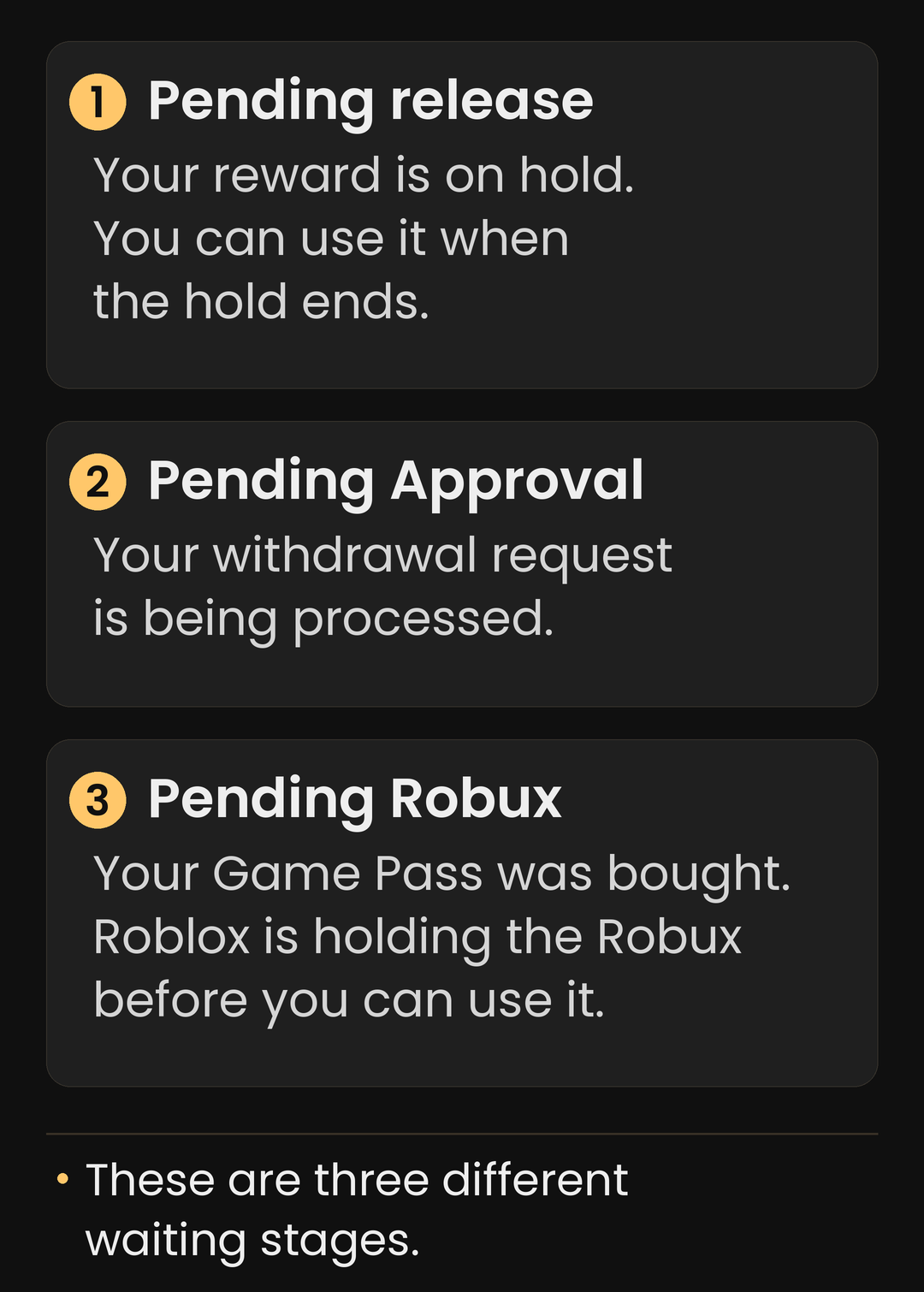
There are three separate stages that can involve waiting:
Where to check
Pending release: A reported activity reward is waiting for release into your available balance. Check your CashBlox activity and notifications.
Pending Approval: Your withdrawal request is still being processed. Check your withdrawal history.
Pending Robux: Your Game Pass has been bought, but Roblox is holding the Robux before you can use it. Check Pending Robux on Roblox's My Transactions page.
Providers can also reverse previously reported completions. When that happens, the corresponding reward can be removed. Keep evidence of completed requirements and use support if you need help understanding a missing or reversed reward.
How CashBlox Robux withdrawals work#
Open Cashout and choose Robux. Check the withdrawal requirements for your account and follow the instructions for the amount you want to withdraw.
The Game Pass process is:
Choose the withdrawal amount and select your Roblox experience when prompted.
Create or prepare the Game Pass requested by the withdrawal flow.
Put the pass on sale at the price CashBlox shows, then save your changes on Roblox.
Complete the required checks and confirm the withdrawal request.
Check your CashBlox withdrawal history for its status. After the pass purchase is completed, check Roblox for the sale proceeds.
Keep the pass available for sale while the request is being processed. If CashBlox cannot find it, check the selected account, experience, pass and sale settings. If everything matches the instructions but you still get an error, contact support before guessing a different price or submitting repeated requests.
Why is the Game Pass price higher than the Robux amount?#
Roblox applies a transaction fee to Experience Pass sales. The pass's sale price and the amount the seller receives are therefore different. CashBlox's withdrawal flow provides the price to use for the requested withdrawal. If you want to understand this fee and how the calculation works, the Robux Tax Calculator and Game Pass Calculator on CashBlox Tools let you check any amount.
Use the current withdrawal instructions rather than copying a price from an old video or calculating one from an unrelated Marketplace item. If the displayed instructions conflict, ask support to check them.
Why are my Robux still pending on Roblox?#
Roblox Support explains that proceeds from Experience Pass sales are held in a pending status, called escrow, before becoming available. You can check that amount on Roblox's My Transactions page.
This happens on Roblox after a pass sale; it is different from a CashBlox request that is still awaiting processing. A processed withdrawal does not mean Roblox has already released the Robux for spending. Follow Roblox's current guidance for its holding period rather than assuming a guaranteed arrival date. The Pending Robux Helper explains the hold period for Game Pass sales and other sale types.
Help your offers track correctly#
Use one CashBlox account and follow the account rules.
Do not use a VPN or proxy; the CashBlox FAQ prohibits them.
Check whether the offer requires a new app installation or a new player account.
Read every milestone, deadline, purchase condition and device requirement.
Start through the offer's provided link and follow its tracking instructions.
Review any provider-specific browser or tracking requirements before proceeding.
Keep a record of the offer name, provider and requirements, plus proof of completion.
If an offer does not credit, check its requirements and stated tracking period first. Do not repeat it to force a reward unless its instructions explicitly allow another attempt. The CashBlox FAQ explains common tracking problems; an available report option or a support ticket can help you raise a specific case.
Include the offer name, provider, approximate completion time and relevant proof. A clear report gives support something concrete to investigate; it does not guarantee that a provider will approve the completion.
Referrals and other CashBlox features#
Beyond individual offers, the affiliate program lets users refer friends and earn a share of qualifying referred activity. The leaderboard shows competition standings, and the site also includes features such as promo codes, streaks and rain events.
Check each feature's current rules and availability. Reward amounts, qualifying actions and active promotions can change, so treat these as extras alongside the main earning activities.
Common questions about CashBlox#
Is CashBlox free to use?
Joining CashBlox is free, and there are activities that do not require a purchase. Some offers do involve spending, though. Read the requirements before choosing an activity and account for both the time and any money it requires.
Does CashBlox need my Roblox password?
No. The CashBlox sign-in flow asks for your Roblox username and a security check. Ownership verification uses a phrase in a Game Pass description. Do not give someone your Roblox password to help them verify your CashBlox account or process a withdrawal.
How much Robux can I earn on CashBlox?
There is no single amount that applies to everyone. Your available activities, eligibility, completed requirements and provider approvals affect what you earn. Use the rewards shown for individual activities to decide whether they are worth your time; do not treat them as a guaranteed hourly or daily income.
What is the minimum CashBlox withdrawal?
Check Cashout for the requirements that apply to your chosen method and account. If a message conflicts with the instructions or you cannot submit an eligible withdrawal, ask support to clarify it before continuing. Avoid relying on a minimum quoted in an older guide.
Why can another person see different surveys or offers?
Activities can depend on country, device and provider eligibility, as well as current availability. Seeing an offer in someone else's screenshot does not mean it will be available or appropriate for your account.
How long does a CashBlox withdrawal take?
Check the withdrawal's status in Cashout. Processing on CashBlox and the Pending Robux stage on Roblox are separate, and waiting times can vary. Use the relevant platform's current status information and support instructions.
Where to get help#
Use the CashBlox FAQ for general questions and open a support ticket for an account-specific problem. You can return to your support tickets to follow the conversation.
Before using the site, read the Privacy Policy and Terms of Service. For more background on the platform, visit About CashBlox. When you are ready to explore, choose an activity whose requirements you understand and keep track of both its progress and reward status.
Sources
Earn Robux by completing surveys, games and offers on CashBlox.