7 Best Ways to Earn Free Robux Online in 2026
Want Robux for a new outfit or a game pass? There are several ways to earn it, from playing games through CashBlox to building something for Roblox players. Below, you'll find seven options, what you need to get started, and how each one pays you.
By CashBlox Team · Guides · Research checked 13 October 2026Published Updated 8 min read
Summary
Start with CashBlox games and surveys if you want a task with a clear goal and reward.
Making YouTube videos and inviting friends give you more ways to earn through CashBlox.
Building games, helping creators and selling tools are options if you already have a skill or want to learn one.
Compare the seven methods#
For games, apps and surveys, choose tasks you can finish without a purchase, deposit, paid trial or subscription. For creative work, start with free tools and your own ideas.
| Method | What you do | What you receive |
|---|---|---|
| 1. CashBlox games and surveys | Finish a game goal, try an app or answer a survey | CashBlox balance → Robux |
| 2. Microsoft Rewards | Collect points and exchange them for an available Roblox gift card | Points → Roblox gift card → Robux |
| 3. CashBlox Creator Program | Make an approved YouTube video about CashBlox | CashBlox balance from eligible views → Robux |
| 4. Invite friends | Share your link with friends who complete tasks | Commission in CashBlox balance → Robux |
| 5. Build a Roblox game | Make a game people want to play | Player purchases or Creator Rewards → Robux |
| 6. Help Roblox creators | Get paid for building, drawing, design or code | Robux, or cash → buy Robux |
| 7. Sell models or plugins | Make something other creators can use | Cash → buy Robux |
1. Play games and answer surveys on CashBlox#
CashBlox lets you earn rewards by playing games, trying apps and answering surveys. A game offer might ask you to reach a certain level or finish a set of goals. The offer shows what you need to do, its reward and the deadline.
Start with a game you'd enjoy playing. A bigger reward can involve more work, so look at the goal before choosing.
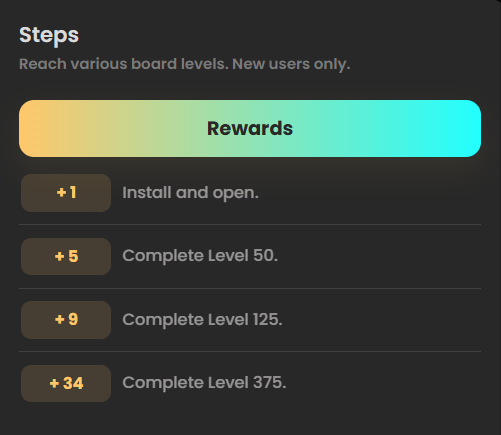
Open Earn and pick an offer or survey.
Read the goal and start through its CashBlox link so your progress can be tracked.
Complete the task before its deadline. Keep a screenshot of the offer and your progress in case you need help.
Once the reward is added to your balance, use Cashout to request Robux.
Robux withdrawals start at 7 R$ in your CashBlox balance. Before your first withdrawal, you also need to earn 7 R$ from offers or surveys. There's a recent-earnings requirement too: at least 7 R$ from offers or surveys in the past three months. The same earnings can meet both requirements; you don't need to earn two separate sets of 7 R$.
Promo codes, rain and other bonuses don't replace those task earnings. CashBlox covers Roblox's Game Pass sale fee when you withdraw. The CashBlox guide explains the pass setup and withdrawal steps.
You can also work toward daily task bonuses and leaderboard prizes. Pick a bonus whose goal fits the tasks you're already doing.
2. Collect points with Microsoft Rewards#
Already use Bing or other Microsoft services? Microsoft Rewards lets you collect points through searches and dashboard activities, then exchange them for rewards.
First, open your rewards list and look for a Roblox gift card. Check its value and point cost before you start saving. A promotion for an avatar item gives you that item, not Robux. Microsoft's Roblox rewards
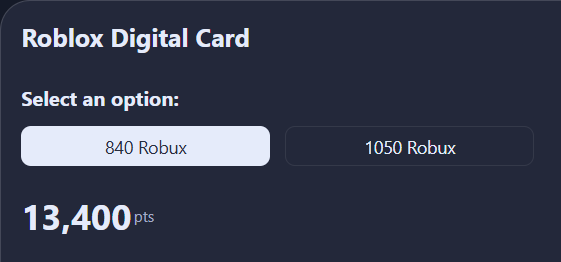
Use Bing for searches you'd normally make and complete free activities on your dashboard. Once you have enough points, claim the gift card and follow its Roblox redemption instructions. Microsoft may ask you to verify your phone number when you claim it. How to claim rewards
Gift cards may come and go, and their point costs can change. Use the details shown in your own rewards list.
3. Make YouTube videos about CashBlox#
If you enjoy making videos, try a tutorial, a review or a Short showing how you use CashBlox. Both Shorts and regular YouTube videos can enter the CashBlox Creator Program.
An approved entry earns 20 R$ in CashBlox balance for every full 100 eligible views. Views gained while your entry is paused or your video is private or unavailable don't count.
Make a public video about CashBlox and put your exact referral link in its description.
Use a verified CashBlox account to submit the video within 14 days of posting it.
Wait for the CashBlox team to review it. Once approved, the entry can earn for 30 days from its first approval.
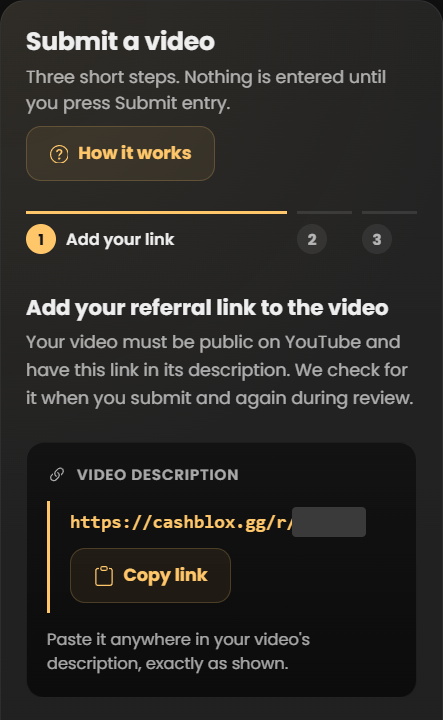
You can have one entry in progress at a time. Rewards are added to your CashBlox balance as views are counted; program limits and payment delays can apply. Use the same Cashout process as your other CashBlox rewards.
4. Invite friends to CashBlox#
Have a friend who wants to try earning rewards too? Share your CashBlox referral link. When an offer or survey reward is added to their balance, you earn a share of the amount before bonuses. This share is called a commission.
The starting rate is 5% at Tier 1. For example, if your referred friends receive 200 R$ in offer and survey rewards before bonuses, your commission is 10 R$ in your CashBlox balance. Your friends keep their full rewards; CashBlox pays your commission separately. A signup alone doesn't earn the commission. CashBlox referral rates
Open Affiliates, copy your link and share it with people who are interested. Tell them you can earn a reward through the link. A quick explanation of a task is more useful than posting the same link everywhere.
5. Build a Roblox game#
A longer project for people who enjoy making things.
Start small: a short obstacle course, a simple racing game or one idea you want friends to try. Roblox Studio lets you build and test without buying assets.
Once your game is released and people play it, you can offer passes or developer products. A pass can unlock a lasting perk; developer products are purchases players can make more than once. Roblox passes
Focus on making one fun activity work well before adding more. Earning from a game takes players, so finishing the game doesn't mean it will immediately make Robux.
Releasing it to players involves Roblox's account checks and content questions. Reaching all ages has extra requirements, including subscription history or a publishing fee, so that option may cost money. The publishing guide explains the available options.
Games can also earn Creator Rewards when player activity meets Roblox's rules. Those rewards have a 60-day hold before they become available. Creator Rewards
6. Get paid to help Roblox creators#
Useful if you can build, draw, design or code.
You don't need to make a whole game to help someone with theirs. A creator might need a small map, a menu, a game icon or a script that fixes a problem.
Make a few examples of your own work, then look for suitable jobs on Roblox's Talent Hub or through an established creator team. Before starting, agree on:
What you'll make and when it's due.
How many changes are included.
The amount you'll receive after any fees, whether it's Robux or cash, and when you'll be paid.
Start with a job you know you can finish. Roblox doesn't guarantee a client's payment or settle disagreements for you, so keep the agreement in writing. Talent Hub guidance
An existing team can use group payouts for members who meet the payout requirements. You don't need to pay to create your own group just to work for a team. Group payouts
7. Sell your own models or plugins#
For experienced creators. This pays cash first.
A model is something another creator can use in a game, such as a building or a vehicle. A plugin is a tool that helps them work in Roblox Studio. If you've made something useful, Roblox's Creator Store lets approved sellers sell models and plugins for US dollars.
Start with one original item, test it and add clear instructions. You'll need an approved seller account, account verification, two-step security and payment details through Stripe. Check whether seller signup is available to you before preparing a paid listing. Sellers aged 13–17 need a parent or guardian to agree to the terms and provide the required payment-account details.
Taxes and payment-processing fees are deducted from sales. The money is held for 30 days, then paid on the monthly schedule; a minimum payout may apply. After the money reaches you, you can use Roblox's official checkout to buy Robux. Creator Store selling and payments
How much Robux can you earn?#
Start with the reward for a task you can actually finish. A large offer isn't useful if you can't reach its final goal before the deadline. For Microsoft Rewards, look at the points you need for the gift card you want. For creator work, agree on the payment before you start.
There's no fixed daily amount across these methods. Some days you may finish a task or receive a payment; other days you may still be working toward it. The referral example above shows how the 5% rate works, not a daily earnings target.
If you're starting today, pick one free task and follow it through. That gives you a clearer idea of the work involved than adding up the biggest rewards on offer.
Skip Robux generators#
Robux generators aren't a working way to earn Robux. Don't give a reward site your Roblox password, login cookie or verification codes. A login cookie is saved sign-in data that can let someone access your account. Roblox's advice
CashBlox doesn't ask for those Roblox login details. Its account and safety guide explains how sign-in and account checks work.
Common questions#
Can I earn free Robux without surveys?
Yes. You can choose game offers, try apps, make a CashBlox YouTube video, invite friends or do creative work. Pick an option you enjoy enough to finish.
Does playing any Roblox game earn me Robux?
No. Simply joining a Roblox game doesn't pay you Robux. CashBlox game offers pay rewards for specific goals, while Roblox Creator Rewards pay the people who make games when their players meet the program's rules.
When can I spend my CashBlox rewards on Roblox?
After you request a withdrawal and your Game Pass is purchased, Roblox holds the Robux as Pending Robux. You can spend it once Roblox releases it. Roblox's pass payment guidance explains that stage.
What if I finish a task but don't get the reward?
Check how long the offer says the reward should take to appear. If that time has passed, contact the offer provider or CashBlox support with your screenshots and completion details. Keep the offer name and goal handy so they can find the right task.
Sources#
CashBlox: how it works, Creator Program and referral rates.
Microsoft: Roblox gift cards and rewards and claiming rewards.
Roblox: publishing games, Creator Rewards, Talent Hub and Creator Store.
Ready to try a task? Browse CashBlox games, apps and surveys and pick one you'd like to start.